By linking a channel or group to a product, purchasers of the product will be added (via an invite link) to the Telegram channel or group. This process is described in more detail in the Checkout and Activation section of these support documents.
You can link a private channel or group to any Simple WooCommerce product.
Open an existing product for editing, or create a new product. Scroll down to the Product data section of the page. Ensure the Simple product type is selected. The Telegram Access tab will now appear.
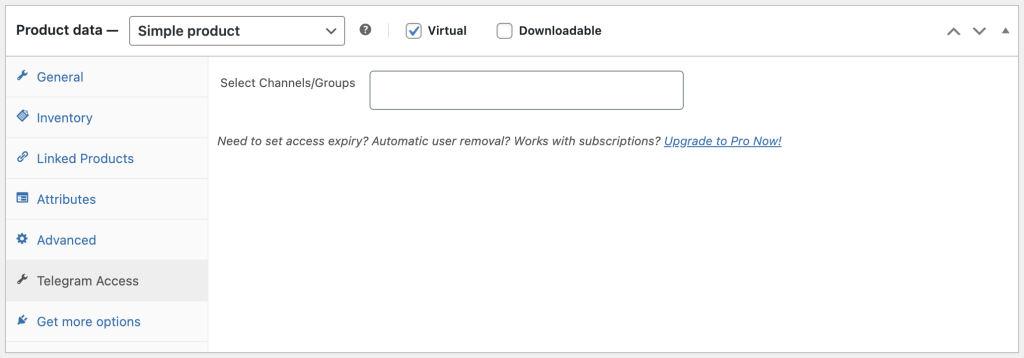
Link a Private Channel or Group #
To link your private channel or group to the product, click in the Select Channels/Groups box and choose the channel name used when retrieving the ID’s in the settings step of these support documents, then save the product.
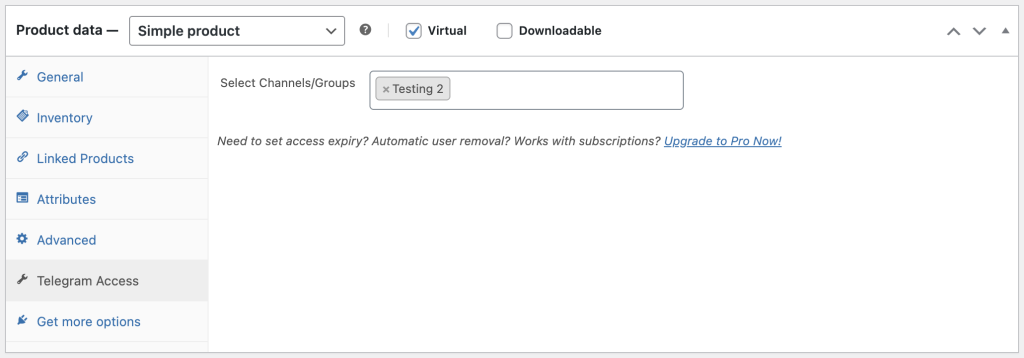
Now, whenever a user purchases this product, they will be guided to the Telegram invite flow after a successful checkout.
Additional Options Available for Simple Products in the Pro Version #
The Pro version of Subscriber Manager for Telegram, when used with a Simple product, is setup in the exact same way. The two differences as it applies to Simple products are:
- Link multiple channels or groups to the product – The Pro version allows you to link unlimited channels or groups to a Simple product. Click within the Select Channels/Groups box and choose additional channels or groups you want linked to this product. The user, after checkout, will receive a Telegram invite link for each channel or group.

- Access expiry (days): This option is only available for Simple products. It simulates a “subscription” period, and would typically be used when you are not using a subscription plugin such as WooCommerce Subscriptions. For a monthly “subscription”, you could use a value of
30days, or use365days for an annual “subscription”. Users will be automatically removed from the private channel or group when the number of days since they purchased the product equals this value. Keep in mind that as a simple product, this is not a true “subscription”, and does not auto-renew. Users will need to purchase the product again to regain access to the channel or group.
If auto-renewal for recurring revenue is required, using the plugin together with WooCommerce Subscriptions is required. This also provides for a better user experience as they are not required to re-join or re-activate on every renewal. See the section on linking channels or groups to Simple Subscription products for more details.
Using Variable Products #
If you need different Telegram channel access per product variation, use a Variable product instead of a Simple product. Each variation gets its own channel selection and expiry settings.
For the full setup guide, see Link a Channel or Group to a Variable Product.


